VMWare Interview Questions
The following are some of the roles of a VMware administrator:
Managing the host's storage
Managing the VMs
Maintain and upgrade the Virtual Center
Simplify template management and cluster management
Coordinate with vendors
VM Troubleshooting, etc.
1. What is the importance of virtualization?
A virtualization process creates a virtual version of a physical device.
Such as a server, storage device, network device, on a physical host. On a single machine/server known as an ESXi (ESX integrated) host, several virtual machines, as well as multiple operating systems and applications, can be operated.
It has the following advantages:
Increasing IT agility, flexibility, and scalability while reducing costs.
Increased workload mobility, performance, and resource availability.
Automated operations that save time.
Simplify IT management and make it less expensive to operate.
2. Explain the different types of virtualization available.
Types of virtualization-
Server virtualization
Application virtualization
Network virtualization
Storage virtualization
Desktop virtualization
Server Virtualization: It is a type of virtualization where many virtual machines (VMs) run on one physical server.
Since you do not have to buy new servers or expand your server room, you save floor space and money.
Server virtualization is offered by a few well-known providers, such as vSphere, XenServer, Hyper-V, and RedHat.

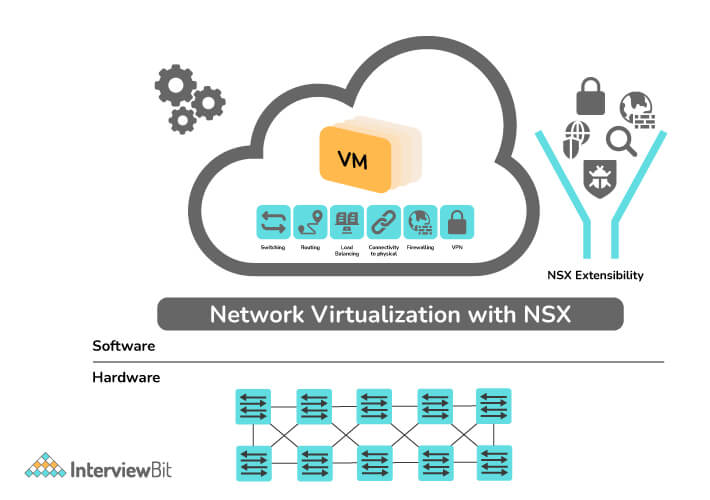
- Network Virtualization: It refers to the process of combining all the physical network components into one virtual network. A virtual network can be composed of NICs, switches, VLANs, network storage devices, virtual network containers, and network media. This type of virtualization has the primary function of eliminating physical network device dependencies. One of its examples includes VMware NSX.
- Application Virtualization: The process involves virtualizing and hosting applications on a server so that end users can have access to them on their devices such as laptops, smartphones, and tablets. Its example includes VMware ThinApp, Citric XenApp, etc.

- Desktop Virtualization: Often called OS virtualization or VDI (Virtual Desktop Infrastructure), desktop virtualization is the process that enables you to run or deploy multiple virtual desktop OS on a physical server or remote server. Its example includes VMware Horizon View, Citrix Xen Desktop, etc.
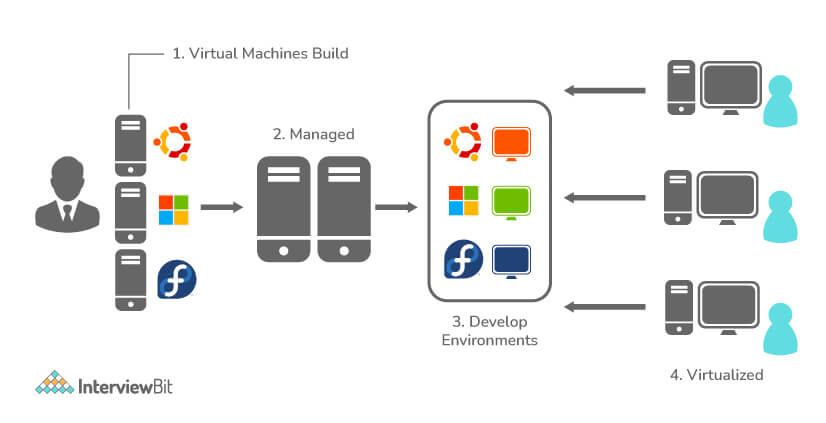
Storage Virtualization: Using storage virtualization, multiple network storage devices can be combined into a single storage device/array by pooling their physical storage. It provides an easy way to manage storage and ensure consistent performance. Its example includes vSAN.
A virtual storage area network (VSAN) is a logical partition in a physical storage area network (SAN). VSANs enable traffic to be isolated within specific portions of a storage area network, so if a problem occurs in one logical partition, it can be handled with a minimum of disruption to the rest of the network.

3. Explain VMKernel and its importance.
VMware's VMkernel is a high-performance operating system that runs directly on the ESXi host.
VMkernel generally acts as an interface between VMs and the physical hardware of the system and is referred to as microkernel by VMware since it runs on bare metal, directly on VMware ESX hosts. I
n addition to providing hardware abstraction and operating system (OS) services, VMKernel allocates memory and schedules CPUs.
In addition, it handles services such as vMotion, Fault Tolerance, NFS, and iSCSI. In order for VMs to communicate with ESXi, the VMKernel is vital.
4. Write four core elements of the VMkernel networking layer.
VMkernel networking enables vSphere to interact with the outside world. It consists of four core elements:
Virtual SAN
Fault Tolerance
Science storage
VMotion
5. What do you mean by Hypervisor? Write its type.
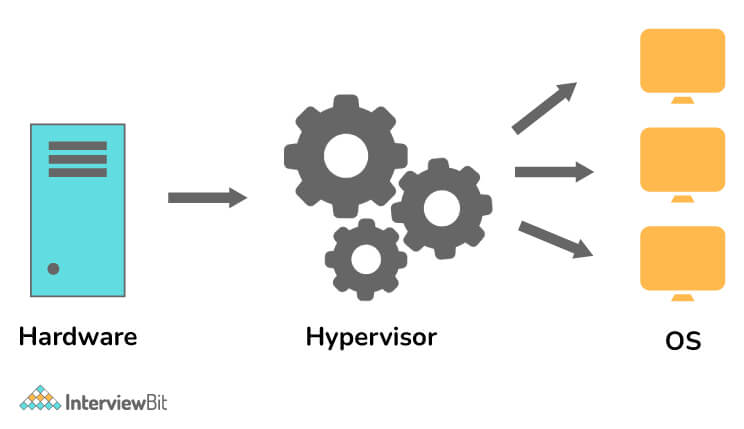
Hypervisors, also known as VM monitors or VMMs, are software that creates and runs virtual machines (VMs) as well as also manages and allocates resources to them. By sharing its resources in virtual ways, such as memory and processing, a host computer can support multiple guest VMs. The special feature of a hypervisor allows several virtual machines to run on a single physical server. As a result, it reduces:
Space efficiency
Energy usage
Server maintenance requirements.
Types of Hypervisor**-**
Type-1 Hypervisor (also known as Bare Metal or Native Hypervisor)
Type-2 Hypervisor (also known as Hosted Hypervisor)
6. What do you mean by ESXi?
ESXi (Elastic Sky X Integrated): ESXi (formerly ESX) is a virtualization platform developed by VMware for deploying and managing virtual machines. With ESXi, you get a very secure OS architecture that includes and integrates essential OS components like the Kernel.
It reduce costs by directly accessing and controlling underlying resources.
It is a hypervisor that makes use of bare-metal virtualization technology.
7. Explain NFS and VMFS.
NFS (Network File System): ESXi hosts use this file-sharing protocol to share files with NAS devices. Storage devices such as NAS connect to networks and enable ESXi hosts to access files.
VMFS (Virtual Machine File System): In VMware vSphere, it is a block-level file system that stores virtual machine files. In vSphere 6.0, it can also store large files up to 64TB in size.
8. Explain the .vmdk file.
Virtual Machine Disk (VMDK) is an open file format by VMware which is used to store the content of virtual hard disks.
In vSphere 5.5 and later versions, it can be up to 62 TB in size. Earlier, VMware products used the extension .dsk to store content or data or virtual disk files.
9. Name some of the VMware products.
VMware offers the following products:
VMware Mirage
VMware Pivotal Container
VMware Photon Platform
VMware Thinapp
VMware vCloud NFV
VMware vCloud NFV Openstack
VMware vRealize
VMware vRealize Operations, etc.
10. What are the VMware components?
VMware infrastructure consists of the following components:
VMware ESX Server
VirtualCenter Server
VMware Infrastructure Client (VI Client)
VMware Infrastructure Web Access (VI Web Access)
VMware Virtual Machine File System (VMFS)
VMware Virtual Symmetric Multi-Processing (SMP)
VMware VMotion and VMware Storage VMotion
VMware High Availability (HA)
VMware Distributed Resource Scheduler (DRS)
VMware Consolidated Backup (Consolidated Backup)
VMware Infrastructure SDK
11. Explain VMware DRS.
DRS (Distributed Resource Scheduler), as the name suggests, provides a way to schedule and balance resources across a vSphere environment. Through the use of clusters and resource pools, virtual environments are able to automatically balance available resources across hosts. DRS uses VMware HA (High Availability) to move VMs from one host to another to ensure that resources are evenly distributed among them.
12. Explain what you mean by Port-group.
As the name suggests, port groups are groups of virtual ports on our virtual switch. In general, the port group provides a stable anchor point for virtual machines connected to labeled networks by aggregating multiple ports into a single configuration. Every port group is assigned a network label, which is unique to the host. VLAN (Virtual Local Area Network) tags, for example, are shared by each port group member.
13. Write three port-groups that are configured in ESXi networking.
The following are the three port-groups configured in ESXi networking:
Virtual Machine Port Group: They are used for Virtual Machine Network.
Service Console Port Group: They are used for Service Console Communications.
VMKernel Port Group: They are used for vMotion, iSCSI, NFS (Network File System) Communications.
14. Explain iSCSI storage.
Generally, iSCSI SANs consist of an iSCSI storage system, which houses one or more storage processors. Communication between the host and array occurs over TCP/IP protocol, and ESXi hosts are configured with an iSCSI initiator. Such an initiator is either hardware- or software-based. The hardware-based initiators can be dependent or independent; the software-based ones are called iSCSI software initiators.
15. What is the meaning of VVol?
vSphere 6.0 introduces the concept of Virtual Volume, also known as VVol, for managing virtual disks. Whenever a virtual disk is created in a virtual environment, VVol is automatically created. At the virtual disk level, it enables array-based operations.
16. Explain Cluster.
In VMware, the cluster is defined as a logical grouping of multiple ESXi hosts. It lets you add and remove hosts from a cluster. HA and DRS are also provided on the cluster.
17. Explain cold and hot migration?
Cold Migration: This is the process of migrating a powered-off VM, including its configuration and data, from a single host to another. One can migrate VMs manually or set up a scheduled task to perform cold migration.
Hot Migration: This is the process of migrating a powered-on VM from a single host to another. It is also known as live migration because there is no need to shut down the VM.
VMware Interview Questions for Experienced
18. Why use virtual machines instead of original hardware?
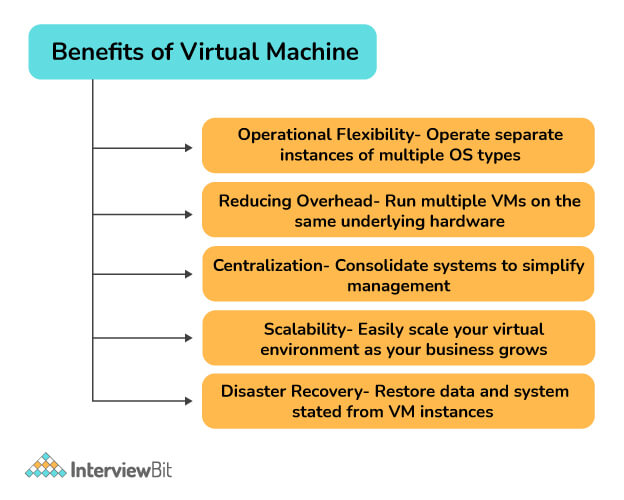
In the absence of virtualization, it would be impossible to run multiple operating systems at once, such as Windows and Linux. Virtual machines serve mainly the purpose of running multiple operating systems concurrently on a single piece of hardware. Splitting a physical server into multiple units reduces the need to invest in additional units. You can also use VMs to enable rapid disaster recovery and automatic backups of your data.
19. What is the major advantage of VM running under a type 1 hypervisor than type 2 hypervisor?
Type-1 Hypervisor: It acts as a lightweight OS and runs directly on the host system. A base server OS is not required, and direct hardware access is available. Its example includes VMware ESXi, Citrix XenServer, etc.
Type-2 Hypervisor: It cannot run directly on the underlying host system, but can run as an application layer on a host system, similar to other computer programs. Its example includes VMware player or parallel desktop, VMware Server, etc.
Advantages of using Type-1 over Type-2 Hypervisor:
It is more secure to use type-1 hypervisors since they do not rely on the underlying OS, unlike type-2 hypervisors. The type 2 server also loses some efficiency, performance, and speed due to this dependency. So, if you're under attack, a type-1 hypervisor will give you better protection than a type-2 hypervisor.
20. What do you mean by RDM?
The Raw Device Mapping (RDM) files are contained in VMFS and act as proxies for raw physical devices. This feature enables VMware's virtual machines (VMs) to access logical unit numbers (LUNs) directly. This eliminates the need to use the virtual machine file system (VMFS) because the LUN can be formatted using any file system like NTFS (New Technology File System). It is generally beneficial for cluster configurations including VM-to-VM, physical-to-VM, or SAN (Storage Area Network) snapshots. But it has some limitations, including the inability to map disk partitions and possibly not working with direct-attached block devices.
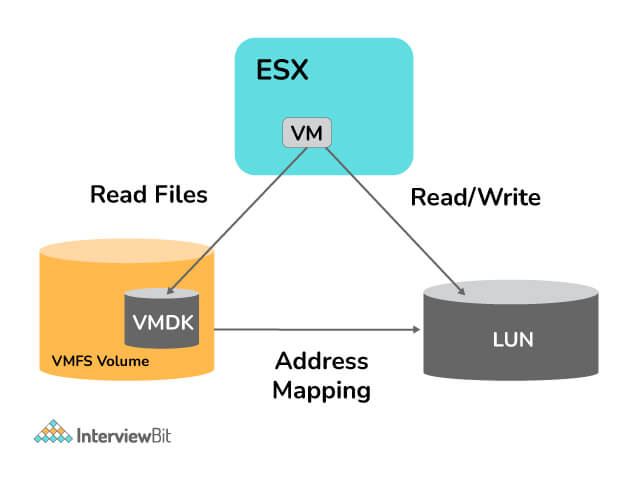
The figure above shows that an RDM disk exists as an address mapping file on a VMFS volume. This mapping file acts as a symbolic link between a VM's access to an RDM disk to LUNs.
21. What is clone and template in VMware? Differentiate between them.
VMware clone: It is an identical copy of a VM (called parent VM (Virtual Machine), since it is the one from which you made a clone). MAC addresses and UUIDs for both cloned and parent VM, however, will be different. Any changes to the cloned VM will not impact the original VM or parent VM (and vice versa).
VMware template: It is a golden image or a master copy of Virtual Machine that is capable of creating and provisioning virtual machines. It can later be used to make many clones.
| Clone | Template |
| An exact copy of an existing virtual machine that works independently. | A master copy of a VM with basic configurations, although it cannot work independently. |
| You can turn it on/off. | You cannot turn on/off or edit a template. |
| It is not possible to convert a cloned VM back to a parent or original VM. | The template can be converted back to a Virtual Machine and updated with the latest configuration before being converted back to the template for use in future VM deployments. |
| They are ideal for test environments or disaster recovery environments. | For deployment of mass virtual machines in production environments, the template works well. |
| For large deployments of VMs, it is not recommended. | When deploying large numbers of VMs, it is recommended. |
| The VM that is powered on can be cloned. | A powered-on VM cannot be used to create a Template. |
22. What do you mean by VMware HA and VMware FT? Difference between them.
VMware HA (High availability): It generally works on Cluster Level. By pooling VMs and the hosts they reside on into a cluster, VMware HA provides high availability for VMs. VMs running on a failed host are forced to be restarted on alternate hosts.
VMware FT (Fault Tolerance): It generally works on VM Level. In this, a secondary VM is created and maintained that is identical to the primary and can replace it when the ESXi host fails to provide continuous availability of VMs. A complete copy of a VM is made, including storage, computation, and memory. To configure FT, a 10GB NIC is recommended.
Difference between VMware HA and VMware FT-
While VMware HA is enabled per cluster, VMware FT is enabled per VM.
VMware HA works on cluster level whereas VMware FT works on VM level.
An HA system will restart and power on VMs on another host in the event of a failure, while an FT system will activate the second copy in case of a loss of the primary host. By providing fast backup and continuous availability, it reduces downtime.
23. How many CPUs can be used for a VM in FT in vSphere 7.0?
In VMware vSphere 7.0, up to 8 vCPUs can be used with the VMware vSphere Enterprise Plus license.
24. Explain FT logging traffic.
For VMware FT, fault tolerance logging traffic is considered as the second network requirement. For continuous data syncing between primary and secondary VMs, Fault Tolerance applies FT logging. Additionally, this is a VMkernel connection type used to move nondeterministic events from primary to secondary VMs.
25. What is the difference between vSphere and vCenter?
VMware vSphere: It's an enterprise-scale virtualization platform that lets you build a reliable and resilient infrastructure to meet pretty much any business need while staying within your budget. Vsphere adds important capabilities to data center infrastructure that prevent unplanned downtime and can completely eliminate maintenance and storage downtime.
VMware vCenter: It is a centralized platform used to manage virtual infrastructure. From a single console, you can control all your hosts and virtual machines, enhancing visibility and preventing errors. Even if you are managing a large-scale environment, vCenter Server lets you optimize routine operations and daily tasks. As a result of this functionality, you are able to get a detailed understanding of how your environment is configured.
26. Will FT (Fault Tolerance) work if the vCenter server goes down?
Fault Tolerance on a VM can only be enabled through the vCenter Server. FT does not require vCenter to be online once configured. Due to this fact, no FT failure between the primary and the secondary will occur when vCenter is down.
27. What is the use of vMotion?
VMware's VMotion technology enables you to migrate active virtual machines from one ESX-host to another without disrupting service or functionality. During this process, there is zero downtime, constant service availability, and overall transaction integrity. vMotion technology plays a key role in creating a dynamic, automated, and self-optimizing data center and provides great flexibility for virtual environments. Ensure that both hardware and software requirements are met by the cloud provider. The compatibility requirements are reduced if powered-off VMs are migrated.
28. What will happen if vMotion fails?
A virtual machine will not be migrated if the target host does not have enough memory i.e., vMotion fails. This can be fixed by moving the VM to another ESXi host providing guaranteed memory, or by reducing the virtual machine's memory reservation.
29. Explain Promiscuous mode.
A promiscuous mode is network security, monitoring, and administration method that allows any network adapter configured on a host system to access all network data packets. You can specify it at the virtual switch or port group level in vSphere ESX/ESXi. Essentially, promiscuous mode is a method of monitoring (sniffing) network traffic. You have two options: accept or reject. Additionally, all communication will be visible to all virtual machines if the promiscuous mode is set to accept.
30. There are several features such as DRS (Distributed Resource Scheduler), SMP (Symmetric Multi-Processing), VMotion, etc., but why do we need ‘HA’?
VMware HA is critical for us since we need uninterrupted service. Let's suppose that one of the ESX servers in the cluster crashes suddenly for some reason. What would happen to the virtual machines running on that server? Do they continue running or are they falling? Likewise, they go down too. Thankfully, VMware HA allows you to restart these VM's on any other ESX server in the same cluster as soon as they fail.
31. What is the importance of snapshots in VMware?
VMware snapshots allow you to quickly and easily save the state of a VM before making changes. A snapshot is taken when upgrading or installing software. In VMware snapshots, the current state of the virtual machine is preserved, so after testing, the machine can be quickly reverted to the desired state. After a specific task is completed, a snapshot should be removed to improve performance.
32. What are vSS and vDS?
To connect virtual machines, VMware vSphere offers two types of virtual switches. vSphere administrators can control the traffic between VMware virtual machines using either type of virtual switch.
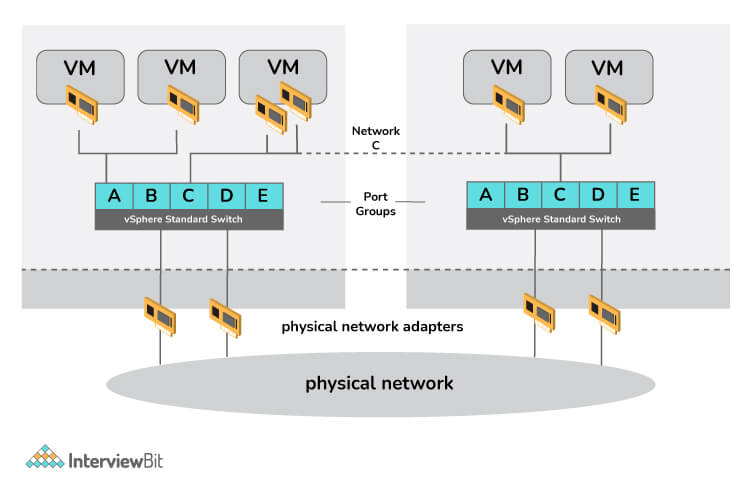
- vSphere Standard Switch (VSS): VSS is the default virtual switch when ESXi is installed. The switch allows VMs installed on one physical host to communicate with one another. The switch controls how a VM communicates with another VM on the same physical server, just as a physical switch would.
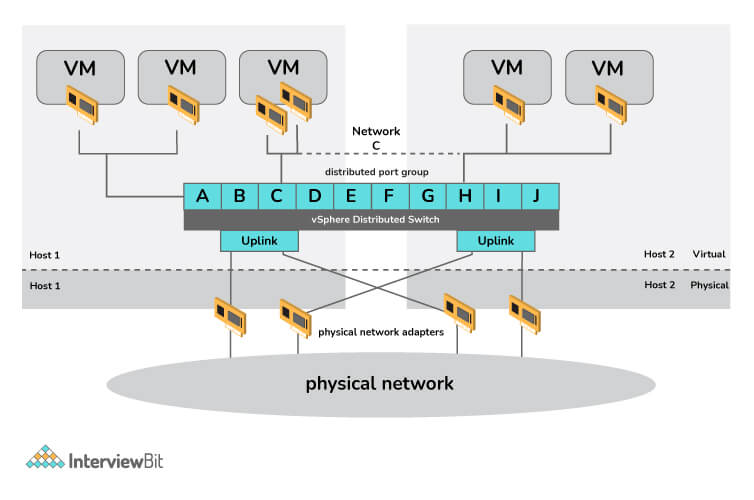
- vSphere Distributed Switch (VDS): It acts as the single switch in a virtual environment and provides central provisioning, administrative, and monitoring capabilities for virtual networks. Additionally, it supports advanced networking features in VMware vSphere.
33. What is VDI?
With VDI (Virtual Desktop Infrastructure), users can host a desktop operating system (OS) on a server and access VM-based desktops remotely from different devices and locations. VDI is a type of IaaS (Infrastructure as a Service), which can be run in a private or public cloud. When VDI is used, the end-user can access his or her desktops via a device called a thin client.
34. What do you mean by vCloud Suite?
vCloud Suite is often described as an enterprise-grade cloud and management solution. It is a collection of multiple VMware components to build and provide a completely integrated cloud infrastructure, that includes virtualization, software-defined datacenter services, disaster recovery, application management, etc.
35. Why use VMware Workstation?
VMware Workstation is software that allows users to run multiple operating systems on the same host computer. Virtual machines are capable of running one instance of any operating system such as Microsoft, Linux, etc.
Here are three reasons why VMware workstation is useful:
Allows the user to run more than one operating system on the same computer.
It saves the current OS configuration as virtual machines.
You can work across different OSs without switching.
Tips to Prepare for VMware Interview
36. VMware Interview Preparation
The Generic Tip: Using online IDEs and platforms such as HackerEarth, Hacker Rank, LeetCode, Code Chef, and so on, is always a good idea for practicing coding questions. Since it is critical to code your solution accurately and in a timely manner, use the programming language you're most comfortable with.
Speak what you believe: At the moment, the point is how to give them what they are looking for. The interviewer will have no prior knowledge of your abilities, yet they will attempt to assess your years of education in 30–40 minutes. Even if you write the correct solution to the problem without saying anything, the interviewer is unlikely to deduce anything about your mental state. The only way out is to say exactly what you're thinking because your voice is the only method for them to understand what and how you are thinking. So, you must express yourself at every stage of your thought process. Even if you believe your method may be incorrect, just say so. Don’t ever hesitate.
Prepare Well: The technical round may include a number of questions. Prepare all in advance. Make sure you have knowledge of DSA. Basic questions related to coding, OS, process synchronization, recursion and iterative techniques, sorts, searches, and traversals should also be considered as well. Become well-versed in fundamental subjects such as operating systems, databases, and computer networks. Reading prior interview experiences and questions will also improve your insight into the interview process.
Ask for Hints: Don't pester the interviewer with demands for hints. In fact, try if you can find and fix the issues yourself. And if you feel absolutely stuck, instead of continuing to flounder, simply ask for help. It demonstrates that you acknowledge your insufficiency of knowledge, but do not immediately give up trying to learn. Make use of the hints you've been given. In most cases, the interviewer is familiar enough with the question to recognize which tips would help you next if you get stuck.
Confidence is crucial: No matter how frightened you are, face the interviewer with confidence. The confidence you exude isn't for you; it's for the interviewer to feel comfortable enough to hire you. You must persuade her/him that you are a valuable asset to the firm.
Prepare generic questions for HR or Managerial round: Find out online what general HR questions you might be asked during your interview. Never know when someone will ask you, "Why did you choose VMware?" or "Why not another company?". It's, therefore, a good idea to learn a bit about the company before your interview.
Ask questions: Be sure to keep the flow two-way. If you have doubts, you should voice them to the interviewer. Your willingness to join will be apparent to the interviewer if you do this.
FAQ
37. How many rounds are there in VMware Interview?
Generally, 4-5 rounds are there in the VMware Interview process:
Online Assessment
Technical Rounds (2-3)
Managerial Interview
HR Interview
38. How to get a job in VMware?
As a software company, VMware is committed to the notion of equal employment opportunities for all employees, as well as to providing a non-discriminatory and harassment-free workplace. At VMware, employees are hired based on business needs, job specifications, and individual qualifications. All applicants are encouraged to apply, whether they are freshers or experienced. Therefore, if you want to get hired, you must prepare thoroughly. Start by researching about the company, their interview process, tips on how to prepare for the interview, and then prepare accordingly. If you would like to apply, you can visit the career portal and apply directly or you can ask for a referral.
39. How long does the offer process take at VMware?
It will take approximately 2-4 weeks to receive an offer letter following the final interview.
40. Why do you want to join VMware?
As a VMware employee, we will be a part of a global community of innovators and leaders that solve technical challenges together. Here, employees are surrounded by an environment filled with possibilities and are always encouraged to bring new ideas to life. Every day, employees are challenged to innovate in everything VMware does.
41. Is VMware Interview hard?
The amount of time and effort you put into preparing for an interview can greatly affect how tough it is going to be. VMware interviews usually consist of easy to medium level questions, however, this depends on the individual. Since the number of rounds varies from 4-5, some candidates may find it intimidating. I assure you it is worth the effort if you join.
Basic VMware Interview Questions
These commonly asked VMware Interview Questions will help you answer your upcoming interview confidently and land your dream job.
1. What is VMware?
VMware is a virtualization technology-based software tool used to test various software virtually by making a virtual operating system. It is like using a different operating system simultaneously as your current OS. It develops virtualization software, which means creating an abstraction layer over computer hardware that allows the hardware elements of a single computer to be divided into multiple virtual computers, also called virtual machines (VMs).
2. What is the reason for using virtual machines instead of original hardware?
VM or Virtual machines allow us to operate multiple operating systems simultaneously from the same piece of hardware. Without virtualization, operating multiple systems like Windows and Linux would require two separate physical units. So it reduces the requirement to invest in additional units by splitting up a physical server into multiple servers.
3. What are the different types of virtualization available?
There are five types of visualizations available, they are:
Application Virtualization.
Server Virtualization
Storage Virtualization.
Network Virtualization
4. What is the server software VMware provides us?
VMware provides us with:
VMware ESX Server,
VMware ESXi Server, and
VMware Server.
5. Name some VMware products.
VMWARE MIRAGE,
VMWARE PIVOTAL CONTAINER SERVICE,
VMWARE PHOTON PLATFORM,
VMWARE THINAPP,
VMWARE VCLOUD NFV,
VMWARE VCLOUD NFV OPENSTACK,
VMWARE VCLOUD SUITE,
VMWARE VREALIZE.
6. What is desktop virtualization? How does desktop virtualization work?
Desktop virtualization is a technology that simulates a workstation load to access a desktop from a connected device remotely or locally. This separates the desktop environment and associated application software from the physical client device used to access it.
Desktop virtualization works in many ways, but the basic two types of desktop virtualization are based on whether the operating system instance is local or remote.
- Local Desktop Virtualization: It denotes the operating system runs on a client device where all processing and workloads occur on local hardware. This desktop virtualization works when users don’t need a continuous network connection and can meet application computing requirements with local system resources. Although this requires processing to be done locally, you cannot use local desktop virtualization to share VMs or resources across a network to thin clients or mobile devices.
- Remote Desktop Virtualization: Remote desktop virtualization is a commonly used virtualization that operates in a client/server computing environment. It allows users to run operating systems from a server while all user interactions occur on a client device. The result is that IT departments have more centralized control over applications and desktops and can maximize the organization’s investment in IT hardware through remote access to shared computing resources.
7. What is network virtualization?
In virtualization technology, network virtualization is the process of combining network resources and network functionality into a single software-based administrative entity which is called a virtual network. It can combine multiple physical networks into one virtual software-based network, or it can divide one physical network into separate independent virtual networks.
8. Explain memory and storage virtualization?
Memory virtualization is the process of creating a memory pool by aggregating the resources of Random Access Memory (RAM) from individual systems in the data centre.
Storage virtualization is a process of taking information about all of the storage hardware resources on storage area networks. Logically this can be used to combine hardware resources from different networks and data centers.
9. What are the components of VMware infrastructure?
The major components of VMware infrastructure are:
VMware ESX Server
VirtualCenter Server
VMware Infrastructure Client (VI Client)
VMware Infrastructure Web Access (VI Web Access)
VMware Virtual Machine File System (VMFS)
VMware Virtual Symmetric Multi-Processing (SMP)
VMware VMotion and VMware Storage VMotion
VMware High Availability (HA)
VMware Distributed Resource Scheduler (DRS)
VMware Consolidated Backup (Consolidated Backup)
VMware Infrastructure SDK
10. What is the requirement for running ESXi in the BIOS of the server?
Running ESXi in the BIOS requires the NX/XD bit to be enabled for the CPU in the BIOS in order to ensure the smooth installation of the software programs.
11. What does ESXi stand for?
ESXi stands for ESX Integrated.
VMware ESXi is a type-1, enterprise-class hypervisor which easily installs on to your server and divides itself into multiple virtual machines. It isn’t a software application, although it includes and integrates vital OS components, such as a kernel.
12. What is VMKernel? What is the VMkernel port used for?
The VMkernel is the interface between virtual machines (VMs) and the physical hardware of the system. The responsibility of VMkernel is scheduling CPUs, allocating memory and providing other hardware abstraction with other operating systems (OS) services.
Virtual machines cannot communicate with the ESXi server without VMKernel, so that’s why it’s very important for VMs.
VMkernel port, also called VMkernel adapter, is a type of VMkernel network interface that works as a service provider used by the ESXi host to communicate with the VMware-based infrastructure. These adapters or ports are created according to the type of services required by vMotion, Fault Tolerance, Management or perhaps vSAN etc.
13. What is VMotion? Why is it used?
VMotion could also be a key enabling technology for creating the dynamic, automated, and self-optimizing data centre.
We used VMware VMotion because it enables the live migration of running virtual machines from one physical server to a special one with zero downtime, continuous service availability, and complete transaction integrity.
14. What is Port-group?
VM port groups are how we will create logical rules round the virtual ports that are made available to VMs. It’s common to make a port group for every VLAN and network subnet that you simply want to present to your VMs.
15. What is vSwitch in VMware?
vSwitch is the software-based virtual networking switch used to connect virtual machines to the ESXi host & it also provides the connectivity between the virtual machines on that virtual switch. vSphere Standard Switch is referred to as vSwitch. Each ESXi host requires its own vSwitch.
16. How does vMotion work in the background?
The Virtual Machine Memory state is copied over the Vmotion Network from the source Host to the Target Host. Users still access the virtual machine and potentially update memory pages. A list of modified pages in memory is kept during a memory Bitmap on the source host.
17. What happens if VMotion fails?
VMotion will fail if the target host does not have enough memory to satisfy the reservation of the virtual machine. If you want to fix this, migrate the virtual machine to another ESXi host that can provide the guaranteed memory for the VM or reduce the memory reservation of the virtual machine.
18. What is the hypervisor and its types?
A hypervisor may be a virtualization layer that permits multiple operating systems to share one hardware host. Each operating system or Virtual Machine is allocated physical resources such as memory, CPU, storage etc by the host. There are two types of hypervisors.
Hosted hypervisor – works as application i.e. VMware Workstation
Bare-metal – is virtualization software i.e. VMvisor, Hyper-V which is installed directly onto the hardware and controls all physical resources.
19. We have got tons of features like VMotion, DRS, SMP, etc, but why do we like HA?
We’d like this because we want our services running without interruption. Assume like, for a couple of reasons if anyone of the ESX server within the cluster goes down suddenly, what happens to the virtual machines which are running thereon particular server? Do they continue to run or go down? Yes, they also go down. But with the help of VMware HA, these VM’s are often restarted immediately on the other ESX servers within an equivalent cluster. But here, you’ll get a downtime of 5 –10 mins because a server crash is an unexpected thing.
Intermediate VMware Interview Questions
If you are someone who already has a basic understanding of VMware, this section is helpful for you as it covers the intermediate VMware interview questions.
20. What architecture changes were seen between ESXi 4.1 and 5.0?
vSphere 5.0 involves a replacement HA architecture. HA has been rewritten from the bottom up to shed a number of those constraints that were enforced by AAM. HA, as a neighbourhood of 5.0, also mentioned as FDM (fault domain manager), introduces less complexity and better resiliency. From a UI perspective, not tons have changed, but there are tons under the covers that have changed. Though no more primary/secondary node concept as stated but a master/slave concept with an automated election process.
21. Is HA dependent on Vmware vCenter Server?
Yes. But only during the initial installation and configuration.
22. What is VM Monitoring status?
HA will usually monitor ESX hosts and reboot the virtual machine within the failed hosts within the opposite host within the cluster just in case of host isolation. Still, I want the HA to monitor Virtual machine failures also. Here the feature called VM monitoring status as a neighbourhood of HA settings.VM monitoring would restart the virtual machine if the VMware tools heartbeat didn’t receive within the specified time using Monitoring sensitivity.
23. What is VMware vSphere API and vSphere SDK?
VMware vSphere API may be a set of interfaces for managing vSphere. You can use the API to try to do most of the items the vSphere Client can do. The API is defined as SOAP Web Services with WSDL. The vSphere SDK could also be a group of libraries that support vSphere API, also as tools and samples that assist your development efforts. The vSphere SDK is additionally referred to as VI SDK, vCenter SDK, ESX SDK, etc. In most discussions, the vSphere API and vSphere SDK are used interchangeably.
24. What’s VMFS?
VMFS may be a block-level, high-performance clustered filing system for virtualization. It is often shared between multiple ESXi hosts or VMs and may simultaneously write and read data to and from one storage location.
25. What advantages does VMware filing system provide over the utilization of traditional file systems?
The advantages of the VMware filing system over the utilization of a traditional filing system are that the structure of VMFS makes it possible to store VM files in a single folder and simplifies VM administration. Traditional file systems authorize only one server to get read/write access to a storage resource. This guarantees that a VM works with only one ESXi server at a time.
26. What’s a VMware Data-store?
Data-stores are the storage containers for files. Generally, data-stores hide the specifics of every memory device and supply a consistent model for storing VM files. Data-stores are wont to hold virtual machine files, templates, ISO images etc.
27. What’s the difference between NFS and VMFS data-stores?
NFS may be a file-level filing system, while VMFS may be a block-level filing system. Once we create a VMFS Data-store, the VMFS filing system is made by the vSphere, but the NFS filing system is on the Storage side and is merely mounted and features a shared folder on the vSphere.
28. What’s iSCSI in VMware?
iSCSI may be a protocol which uses the TCP to move SCSI commands and also enables the utilization of the prevailing TCP/IP networking infrastructure as a cargo area Network.
29. What’s the default port employed by iSCSI during a VMware vSphere environment?
In a VMware vSphere environment, iSCSI uses TCP ports 860 and 3260 with higher-level names wont to address the objects within the protocol.
30. What’s multipathing in vmware?
In VMware, multipathing may be a process that permits you to employ quite one physical path that transfers data between the host and an auxiliary storage device. During a failure of any element within the SAN network, like a switch, adapter, or cable, ESXi can switch to a different physical path that doesn’t use the failed component.
31. What’s FCoE protocol?
Fibre Channel over Ethernet or FCoE may be a transport standard that takes Fibre Channel frames and encapsulates them within an enhanced Ethernet network. FCoE retains Fibre Channel upper-level protocol features like flow control and data integrity checking but not its cables and interfaces.
32. What’s the difference between FC and FCoE?
FCOE maps Fiber channels over full duplex Ethernet networks based on IEEE 802.3 standard. And therefore the other hand, Fiber Channel or FC may be a serial data transfer protocol and standard for high-speed enterprise-grade storage networking. It accelerates to 128 Gbps and delivers storage data over fast optical networks.
33. How does VMware measure IOPS?
VMware measures IOPs by these two formulas:
A. IOPS = 1/(Avg. Latency + Avg. Seek)(ms) (per Disk )
B. Total IOPS = IOPS * Total number of Disks.
34. What’s IOPS in VMware?
IOPS stands for Input/output Operations per Second and may be a common performance measurement to benchmark memory devices like hard disc drives, solid state drives and cargo area networks.
35. What’s the utilization of snapshots in VMware?
The VMware snapshot is used to preserve the state and data of the Virtual machine at the present point in time, so once you are done testing, you’ll quickly revert the VM back to the desired state. In VMware, VMware snapshots are easy and quick thanks to saving the state of a virtual machine before you test a software update, patch or other change.
36. What percentage sorts of snapshots are there in VMware?
As the perspective of files VMware snapshot are often four types:
Delta disk files
Flat file
Database file
Memory file
37. Are you able to restore a VM from a snapshot?
Yes, one can restore a snapshot in VMware by using the Revert and attend commands.
38. What’s ALUA storage?
ALUA stands for Asymmetric Logical Unit Access. ALUA may be a specific memory device capable of servicing I/O to a given LUN on two different storage processors but unevenly. Using ALUA, I/O to a given LUN are often sent to available ports on any of the SPs within the storage array.
39. What’s NUMA in VMware?
The full sort of NUMA is Non-uniform access. It’s a memory design utilized in multiprocessing, where the access time depends on the memory location relative to the processor. The biggest disadvantage is that the access of the CPU is usually the fastest when the CPU can access its local memory.
40. How do I enable NUMA in VMware?
There are thanks to enable NUMA in VMware which is:
Configure one virtual machine to use hyper-threading with NUMA, add NUMA and VCPU.
Click on the VM option then select Edit Settings.
Now configure all virtual machines to use hyper-threading with NUMA. Add numa then configure PreferHT=1 for per-host advanced configuration file.
41. What’s vNUMA or Virtual NUMA?
vNUMA or virtual non-uniform access may be an access optimization technique for VMware virtual machines (VMs), which helps prevent memory-bandwidth bottlenecks. Virtual NUMA is particularly useful with large, multiple VMs during a vApp or high-performance virtual machines.
42. What’s a LUN in VMware? What’s the complete sort of LUN?
LUN stands for Logical Unit Number. LUN could also be a logical section of storage. A LUN is often one disk or multiple disks, and it can also be allocated from a disk pool or disk volume relying on the storage vendor’s terminology. A data store could also be a representation VMware uses for an area of storage that virtual machines can reside on.
43. Why is RDM employed in VMware?
RDM allows Virtual machines to bypass VMFS. VMware’s default storage management interface and access the memory device directly. In this manner, an RDM acts as a proxy for a raw LUN residing during a VMFS volume. RDM or Raw Device Mapping may be a mapping file that maps a LUN on to a VM.
44. What’s the difference between RDM and VMDK?
RDM is additionally referred to as a pass-through disk and may be a mapping file that acts as a proxy for a physical device like a LUN. On the opposite side, VMDK may be a file that appears as an uncompromising drive to the guest OS. Fundamentally it’s a virtual disk drive.
45. How to add RDM to VMware?
First, you’ve got to create the RDM pointer file, then attach the RDM to a virtual machine using the vSphere Client; Right-click the virtual machine you would like to feature an RDM disk, Click Edit Settings, Click Add, Select hard disc, Select Use an existing virtual disk.
46. What’s the first feature of VMware vSAN?
The primary feature of VMware vSAN is its work with VM storage policies to support a VM-centric approach to storage management.
47. What’s the difference between SAN and vSAN?
SAN leverages storage protocols like FCP and iSCSI while vSAN only works with ESXi hosts. Within the case of SAN, storage administrators are required to pre-allocate storage on different systems although vSAN automatically converts local storage resources into one storage pool.
48. What’s NAS in VMware?
The NAS or network-attached storage transport mode enables the virtual server agent proxy computer to read data directly from the network digital computer (NFS) without browsing an ESX host or transferring data over the local area network.
49. What’s vSphere replication NFC?
vSphere replication NFC is that the replication traffic was sent and received using the management interfaces of ESXi and VRA appliances. NFC (Network File Copy) traffic is employed to repeat VM replication data from the vSphere Replication Server appliance at the target site to the destination datastores.
50. What’s VMware VAAI?
VMware VAAI is hardware acceleration or hardware offload APIs which are a group of APIs to enable communication between VMware vSphere ESXi hosts and storage devices.
51. How do I know if VAAI is enabled?
To enabled VAAI steps are following,
In the vSphere Client inventory panel, click the host.
Click the Configuration tab, then click Advanced Settings under Software.
Check that these options are set to 1 (enabled).
52. What’s NFS in VMware?
NFS generally referred to as Network File Systems, may be file-level storage allocated by shared storage. Its network-attached storage will be shared through a cluster in vSphere. It also allows a user on a computer to access files over a network similar to local storage.
53. What’s the default number of ports configured with the virtual switch?
The default number of ports configured with the virtual switch is 128 ports.
54. What’s vDS in VMware?
The full form is vDS is VMware vSphere Distributed Switch which provides a centralized interface from which you’ll configure, monitor and administer virtual machine access switching for the whole data center. And it also provides support for advanced VMware vSphere networking features.
55. What’s a vSphere client?
The vSphere Client is application software that permits the management of a vSphere installation. The vSphere Client provides an administrator with access to the key functions of vSphere without the necessity to access a vSphere server directly.
56. What’s the max number of virtual machines per host?
Maximum number of virtual machines per host is 100.
57. What’s a host and cluster in VMware?
A Host is the virtual representation of the computing and memory resources of a physical machine running ESX Server, and a cluster may be a group of hosts.
58. What’s VMware auto deploy?
Auto Deploy is a process of VMware that stores the knowledge for the ESXi hosts to be provisioned in several locations. Information about the situation of image profiles and host profiles is initially laid out in the principles that map machines to image profiles and host profiles.
59. How does one automate a VM deployment in VMware?
Steps to automate a VM deployment in VMware:
Enter the vCenter IP address, username and password.
Select your vCenter platform.
Enter the registration details, and therefore the new specification name.
Enter the administrator password.
60. What are the 2 reasons why a virtual machine might fail to power on?
The two reasons for a virtual machine might fail to power on:
The virtual machine is running on an ESXi host which has an expired license.
The virtual machine is running on a data-store which has insufficient disc space for the .vswp file.
61. What’s VMware VUM?
VUM, also called VMware vSphere Update Manager, may be a tool that gives a patch management framework for VMware vSphere. IT administrators use VUM to patch and upgrade VMware ESXi hosts, VMware Tool, virtual hardware for virtual machines, and appliances.
62. What’s an appliance in VMware?
A virtual appliance consists of application software running on a preconfigured virtual machine with JeOS or simply enough OS needed to support the functions of the appliance.
63. What’s the utilization of vCenter server?
vCenter is employed to manage multiple ESXi hosts, virtual machines and every one dependent component from one centralized location.
64. What are the most components of vCenter server architecture?
The vCenter Server architecture consists of three main components which are vSphere Web Client, vCenter Server Database and vCenter Single Sign-On.
65. What are the services in vCenter server?
The vCenter Server services are vCenter Server, vSphere Web Client, Inventory Service, vSphere Auto Deploy, vSphere ESXi Dump Collector, VMware vSphere Syslog Collector on Windows and VMware Sphere Syslog Service for the vCenter Server Appliance.
66. What are the extra modules of VMware vCenter server?
VMware vCenter server additional modules are vCenter Update Manager, vCenter Converter, and vCenter Guided Consolidation Service.
67. How do I export VM from vCloud director?
The steps to export VM from vCloud director:
Navigate to the organization you would like to export from.
Click on Catalogs.
Click on vApp Templates.
Right-click on the VM that you simply wish to export, and choose Download.
Click on Browse, and choose a folder and a reputation to store the OVF export
68. Which cloud service does VMware vCloud air provide?
vCloud Air provides three Infrastructure as a Service(IaaS) subscription service types- dedicated cloud, virtual private cloud, and disaster recovery.
69. What’s VMware VADP?
VMware VADP may be a VMware vStorage API that backs up and restores vSphere virtual machines. VADP replaces the VMware Consolidated Backup (VCB) framework, this offloads backup processing from ESX hosts and allows each ESX host to run more VMs.
70. What does MOB in VMware stand for?
MOB in VMware stands for Managed Object Browser.
71. How do I disable Storage DRS for the Data-store?
The steps are:
Browse to the data-store cluster within the vsphere Client.
Click the Configure tab and click on Services.
Select Storage DRS and click on Edit.
Select activate vSphere DRS and click on OK.
An optional step is to disable only I/O-related functions of Storage DRS, leaving space-related controls enabled then perform the subsequent steps.
72. What do you mean by clone & template in VMware? What is the difference between the two?
Clone VMware: Clone virtual machines are the identical copy of the parent virtual machine; however the clone virtual machine and parent virtual machine will have different MAC addresses and UUIDs. Any changes done on a cloned virtual machine will not affect the parent virtual machine and vice-versa.
Template VMware: Template VMware the master copy or golden image of virtual machine that is used to provision virtual machines. This image can be later used to clone multiple virtual machines.
Clone VMware | Template VMware |
Create the exact copy of the parent virtual machine that can work independently | It is a master copy of a VM with basic configuration and can’t work independently |
The cloned VM can’t be converted back to the parent VM or original VM | Template VMware can be converted back to virtual machine and updated the latest configuration before converting back to template for future VM deployment |
For deploying large numbers of VM it is not recommended | For deploying large numbers of VM it is recommended |
Clone VM can we turned on/off | Template can’t be turned on/off or edit it |
Powered on VM can we cloned | Powered on VM can’t be used to create templates |
73. What are VMware HA and VMware FT? What is the difference between the two?
VMware HA: VMware HA (High Availability) works on cluster level. By pooling virtual machines and hosts resides into a cluster. Virtual machines running on failed hosts are forced to restart on alternate hosts.
VMware FT: Vmware FT (Fault Tolerance) works on VM Level. In this a secondary virtual machine is created and maintained as identical to the primary virtual machine and it can be replaced when ESXi hosts fail to provide continuous availability of virtual machines. It is a complete copy of a virtual machine including storage, computation and memory.
VMware HA | VMware FT |
VMware HA is enabled per cluster | VMware FT is enabled per Virtual Machine |
VMware HA works on cluster level | VMware FT works on VM level |
In case of failure the HA system will restart and power on VM on another host | In case of failure the FT system will start secondary host in case the lost of primary host by providing fast backup and continuous availability and reduces downtime |
74. How many CPUs can be used for a VM in FT in vSphere 7.0?
In VMware vSphere 7.0, we can use up to 8 vCPUs with VMware vSphere Enterprise Plus license.
75. Explain Fault Tolerance logging traffic.
Fault tolerance logging traffic is considered to be the second network requirement. For syncing the data between primary VMs and secondary VMs fault tolerance applies FT logging.
76. Differentiate between vSphere and vCenter.
vSphere | vCenter |
vSphere is a complete infrastructure for virtualization | vCenter is a centralized and extensible platform |
It is complete infrastructure for virtualization | It is a centralized and extensible platform |
It allows IT team to build reliable and resilient infrastructure | It allows IT team to automate and deliver a virtual infrastructure |
The initial release of vSphere was April 21, 2009 | The initial release of vCenter was December 5, 2003 |
77. Will FT work if the vCenter server goes down?
Fault tolerance does not require vCenter to be online once configured, due to this no fault tolerance between primary and secondary will occur when vCenter is down.
78. What do you understand about Promiscuous mode?
Promiscuous mode is used for monitoring traffic. In the Promiscuous mode, all the network data packets can be viewed and accessed by all the network adapters operating in this mode. It is a network security, monitoring, and administration method that allows any network adapter configured on a host system to access all network data packets.
79. What do you mean by cold and hot migration?
Cold Migration: In this migration, the powered-off VM, along with its configuration and data, is migrated from one host to another host. The VMs can be migrated manually, or one can set up scheduled tasks to perform this migration.
Hot Migration: In this migration, the powered-on VM is migrated from one host to another. This is also known as live migration because there is no need to shut down the virtual machine.
80. What is the difference between virtual desktop and remote desktop?
Remote Desktop: The remote desktop program allows a computer that is located at a different location and interacts with the desktop as if they are accessing them physically, sitting in front of that device. Its solution is best for people who want to access their computers if they are away from their usual workplace. Also, it is beneficial for the technician who wants to fix any issues remotely by taking the remote console of that system.
Virtual Desktop: Virtual Desktop and Remote Desktops offer similar functionality – under the surface, there are a few significant differences. Virtual desktops provide a pre-configured image of operating systems or applications – separate from the device used to access them. Over the internet, any endpoint device – be it a laptop, tablet, or smartphone can be used to access the virtual desktop.
81. How can I differentiate between virtual machine port groups and VMkernel ports?
The VMKernel port provides connectivity to the host, and it handles the traffic like vMotion, Fault Tolerance traffic, and management. The IP address is assigned to the Virtual Kernel Adapter (VMK) of the VMKernel port group. The Virtual machines are connected to the VM port group.
One of the important differences is that a Virtual Machine port group is just passing your garden variety virtual machine traffic, and a VMKernel port group is passing traffic specific to VMware vSphere.
82. What’s the difference between VMFS and NFS?
VMFS (Virtual Machine File System): VMFS is a block-level file system that is used to store virtual machine files. In vSphere 6.0, it can also store large files up to 64TB in size.
NFS (Network File System): NFS is a distributed file system protocol that was first developed by Sun Microsystems in 1984. It has a client/server architecture, which contains a client program, server program, and protocol that helps to communicate between the client and the server. It helps the user to access the data and files easily over the network.
83. What do you understand about RDM?
The Raw Device Mapping (RDM) files are contained in VMFS and act as proxies for raw physical devices. This helps virtual machines access logical unit numbers (LUNs) directly. The RDM contains metadata used for managing and redirecting disk access to the physical device.
Is VMware interview difficult?
The difficulty of the VMware interview depends on the individuals efforts and the company they are applying for. It may seem quite intimidating if you are a fresher and don’t have much experience, however, it depends on the individual. The questions may range from easy to intermediate.
How many rounds of Interview at VMware?
In the VMware interview process, there are around 4-5 interview rounds, such as:
– Online Assessment
– Technical Round (2-3)
– Managerial Interview
– HR Interview
Does VMware pay well?
According to Payscale, the salary in US may range from $80,267 to $183,781 a year.
What is the role of a VMware admin?
VMware admins use a specific VMware environment such as vSphere that can be used to install computer infrastructure such as servers, virtual machines, and hardware. Troubleshooting and maintenance are part of a VMware admins job responsibilities. Apart from this, they would also work on maintaining the virtual center, simplifying template management and cluster management, coordinating with vendors, and managing the host’s storage and virtual machines.
How long is the interview process at VMware?
The overall interview process takes close to 2-4 weeks, at the end of which, you will receive the offer letter.
This brings us to the end of the blog on the top 80+ VMware Interview Questions and Answers. We hope that this list of the top VMware Interview Questions was helpful and you are now better equipped to attend your upcoming interview confidently.
Also Read Top 25 Common Interview Questions